Powered by Blogger.
Menu :
Showing posts with label TRICKS. Show all posts

How to Schedule or Send Email in Future in Gmail

Schedule email in Future:

Many a times, we need to send out a birthday greeting after four days, but work catches up and you forget to do that. Would’nt it be wonderful if you could send the email now and forget about it, but the recipient receives it on the scheduled day? Or in a profession, that requires regular updates or follow-ups on a periodic basis and wish to schedule all in advance.

    Must Check: Send Email With Password

Boomerang for Gmail

It is a firefox and chrome plugin that allows you to take complete control over when you send or receive email messages in your gmail account.
Once enabled, you can use gmail just the way you normally do,but with more control over how and when you send your emails.

There are a few very simple steps to enable Boomerang feature in your gmail account.
1.    Open your google chrome or Mozilla firefox browser and visit the boomerang website.
  • Click on the install Boomerang button and you can see a google chrome notification.
  •  Simply follow the instructions that you see on your screen like the following.
  • Now just click on Next 
  • Once you have completed the installation process, the next time you log in to your gmail account, the Boomerang feature would be enabled. Boomerang is extremely easy to use.
  • You can proceed to compose an email as you always do. Just below the send button, you will see the send later button that can be used to boomerang the email and send it at a predefined time and date.
  • Boomerang allows you a range of time and date options to choose from-you could delay the email by anywhere between an hour to a few months. You could also choose a specific time and date in the futureThis feature is especially useful in cases like to follow up with a team member or client about same thing many times, at intervals. This can be done by simply clicking on Schedule Recurring Message option after clicking on the send later button.
Believe me or not! This whole process takes less than 3 minutes time! So hurry up and enable the Boomerang for Gmail.

How to Hide Last Seen on Whatsapp in Android,Iphone

Whatsapp one of most downloaded Android app.I am sure if you are a smart phone user then you might also be usingWhatsapp.One survey tells that more then 1 billion whatsapp messages are sent daily.
Whatsapp offers a excellent feature last seen option.It will let you know whether the person on other side checked your message or not.Actually this is a best feature but now a days it has becoming trouble for many people.Yes if you want to skip chatting with your friends then this is a big problem because as when you saw the message the person on other side get notified by last seen time and date.If you are the one who want to skip conversations and avoid misunderstandings with friends then this article is for you.! Now hide last seen on whatsapp and read messages without knowing to others.

Must Check: How to Disable SEEN option in Facebook

Hide last Seen in Whatsapp in Android

  • Just download the app form Here
  • Now open app and click on "Block last Seen".
  • That's it now you can hide last seen in Whatsapp.

How it works?

  • This apps will disconnect internet connection when you open whatsapp.so servers can't update last seen seen when you open message.
  • Now When you close whatsapp the internet connection is active and will send the messages without updating last seen status.

Using Manual Method to Hide last seen in Android:

It's simple just disable mobile data,open whatsapp read messages and close it.Now activate mobile internet connection.

Hide Last Seen Stamp in Whatsapp in Iphone:


In Iphone hiding last seen is pretty easy then Android.Latest version of whatsapp for iphone has "Last Seen Timestamp" option.This will help you to hide last seen status in whatsapp.To activate it just go Settings --> Advanced-->Last Seen Timesatmp and now make it Off.
Must Check: 5 Best Whatsapp Alternatives

Top 20 Best Funny Google Tricks

This summary is not available. Please click here to view the post.

How to Add Pattern Lock to Iphone

Yes! you right now you can have pattern lock for your iphone just like for Android mobile.I am iphone lover but one feature  in Android made more interesting is pattern lock.

Also check: Top 5 Best iphone Games

In iphone you can have slider to unlock the phone.Android added a new feature patter lock.You can unlock your mobile by drawing pattern.As you know the locked screen displays nine dots.You can set a pattern to lock the mobile and  to unlock you just have to redraw the pattern.


This Pattern lock attracted me.So i decided to have a pattern lock for my Iphone.And  you already  know that if you have any best feature in any mobile that is updated in other mobile also!
in Iphone by default you don't have option to add pattern lock.but i found an app in cydia to add patter lock for iphone.

Yes its true App name is:--> Android lock hack
  • Go to Cydia store and Download Android lock for free.
  • To activate Pattern Lock Go to Settings and tap Android lock and then tap on Change Pattern.

  • Now draw the pattern you want to use it as password to unlock your iphone.Don't forget to remember the pattern you have added.
  • Now Click on Sleep button at right side top of iphone to lock it.
  • Now to unlock your iphone draw the pattern you added before.


ATARI BREAKOUT Game on Google -Google Tricks

Google celebrates the 37th anniversary of the wonderful game ATARI BREAKOUT developed by atari inc by allowing to play the original game on web.
breakout
There is a speciality in this version of game the google has printed the thumbnails of various search results on the blocks present in the game,

HOW TO PLAY ?

Well as of now breakout is working , we can't speculate about the duration for which this game will be available on google
just open the google images and type ATARI BREAKOUT in the search box press enter and wait for few seconds and enjoy the ATARI BREAKOUT 
now control the game with mouse or left & right arrows on keyboard
below is the small demo video


If you know any other games let us now by the comments below.Don't forget to share this article..!!

              Also Check: Funny Google Tricks

How to Speed Up your Pendrive-Data Transfer


Are you looking to make your pen drive speed up for data transfer? 
Then you are at the right place.The data transfer from PC to Pendrive or from pendrive to pc  depends on 3 main factors 

1.Type of files being transferred :

music,video and office file will be transferred with a much higher rate compared to application files, you must have experienced this shift

2.Aging of pendrive:

This point is common for any device, older pendrives have a very slower rate of transfer 

3.Port version of the usb

nowadays almost every pendrive is a USB2.0 device wen such usb is inserted in a old system which has a usb port version of 1.1 the data transfer will be drastically reduced

well the above 3 factors can not be controlled but there is a simple 3 step process which can give you the max out of your pendrive 

ALWAYS SELECT NTFS FILE SYSTEM:

we cant transfer larger files(>4GB) if the pendrive is not in NTFS mode so right click on pendrive click on format and under file system select NTFS , it  is preferred to uncheck on quick format.

format in ntfs

CHECK FOR DISK EROORS

Under the properties tab of pendrive click on tools and then click on "check-now" button under error checking menu and start the scan to fix errors if any , depending on the size of pendrive it may take some time depending on the size on pendrive.
check for disk errors

CHANGING DEVICE POLICY

Under pendrive properties tab click on hardware select your usb device and click on properties a new window should pop up in that window click on change settings 


  • Now move on to the policies tab and check better performance and atlast click on ok

Note: If you change the device policy and check on better performance then you must always eject your pendrive only after clicking on safely remove your usb option in task bar and it is always recommended to remove the pendrive from usb port wen it is not in use
       
Must Check: How to make windows 7 faster
                                 

How to Convert FAT or FAT32 to NTFS

Hi friends,welcome back to Alltechtricks.Before going to convert FAT32 to NTFS let us see what actually FAT or NTFS means.


FAT (file Allocation table):

  • FAT is a file system used by mainly windows based operating systems.
  • It is a data structure which is created by windows while or when you format a specific volume using FAT or FAT 32(FAT32 is the derivative of file allocation table) filing systems.
  • FAT32 works great in windows XP,2000,2003and other old windows operating system.
  •  FAT32 is good at handling small files and it can handle files up to the size of 4GB.

NTFS(New technology file sharing system):

  • NTFS is an advanced file system which is used by most of the current windows operating system.
  • NTFS can handle files more than 4GB.
  • It provide performance,security,and advanced features that are not found in any version of FAT. For example, NTFS guarantees volume consistency by using  standard recovery techniques. If a system fails, NTFS uses its previous logging  information to restore the consistency of the file system.
     
    Now i think that you are familiar with FAT and NTFS let us move further in converting FAT to NTFS.Usually most of the flash drives are preformatted by using FAT32.For example if we unrar any file which is more than 4GB into a flash drive which is preformatted with FAT32 ,we will notice "NOT ENOUGH DISK SPACE ERROR ", until then we dont bother to change it into NTFS.To overcome this type of problems microsoft as added a command in command prompt i.e"convert" command.We can convert it without using any software by using the "convert" command.

    STEPS:

    1.Go to start button and open run.
    2.In Run,type cmd.
    3.In that type "help convert" command.It gives you information about converting FAT to NTFS.

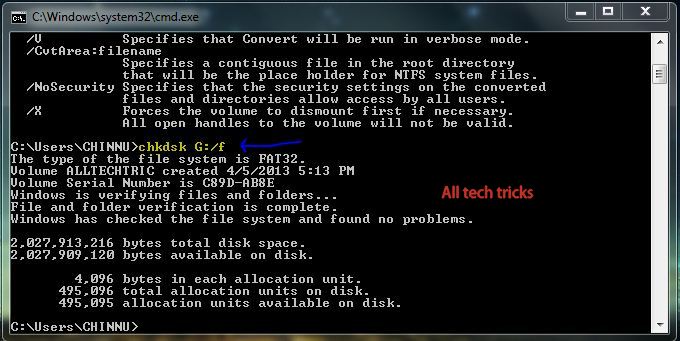
    4.In this i am using G as flash drive which is initially in fat32 format.

    5.Before converting the flash drive into NTFS you can check for disk error by typing "chkdsk X: /f"(without quotes)where X represents the flash drive which you are going to convert.

    6.Before converting it is recommended that you back up the data.
    7.Now in order to convert it enter the following command
                                                           convert G:/FS:NTFS
    here "g" represents my flash drive.you can find this command in the help convert command.After entering the command and press enter and wwait for few sec or min.Then cmd show a message that conversion is successful.

    8.You can check whether the conversion took place or not by going into the properties.

    It works great in windows xp,windows 7,windows 8,windows vista.You can also convert any hard drive.

    NOTE: 

    • This method cannot convert NTFS to FAT(reverse process does not takes place).
    • In order to convert back into FAT just format the drive.
    If you like the article dont forget to share or like it.If you have any queries  fell free to comment below.

    Google Search Tricks and Tips

    Google Search Tricks Saves your Time:

    We often get up struck while searching  for our project presentation ,assignment , ppt , seminar topics etc on Google , I would we sharing some tips in this article by which we can get the desired search result .
    Google uses the best algorithms to produce search results , we can further filter these results based on our requirements such as we can filter the search results based on their file formats , based on date they are modified , based on the website :

               Also Check: Funny Google Tricks

    Search Result's Based On File Format : 

    suppose you are trying to prepare a ppt on "transistors" and you want to see some ppt's that are available on web for reference then your search keyword must be :
                                        
                              transistor type:.ppt
    GOOGLE SEARCH TIPS  & TRICKS
    you can see  search results showing only .ppt files

    similarly you can search for specific file format such as .pdf , .doc , .xls .......
    the syntax must be keyword type:.file format

    SEARCH RESULT BASED ON PARTICULAR WEBSITE/DOMAIN

    Based on our search topic we can figure out from which kind of website we want the content(data) from
    i will stick with my previous example i.e transistor , my keywords relates me to education , so would be intrested in the educational website's so i would be intrested in .edu

    transistor site:.edu

    GOOGLE SEARCH TIPS  & TRICKS
    based on domain
    if you want result from specific website suppose i want the seults from IIT BOMBAY  website then my search keyword would be 

                              transistor site:www.iitb.ac.in

    overall the summary of this tip is to get result from specific website or domain the google search keyword must be keyword site:(.domain)or(website url)

    SOME TIPS TO CHOOSE YOUR KEYWORD :

    Keep the keyword as small as and as simple as possible do not complicate the keyword with unnecessary prepositions , use proper synonyms

    wrong : how to stop my head bursting 
    right : medicines for headache 

    USE OF SOME FILTERS IN THE KEYWORD 

    OR 
    this can be used if u want to search results for either of your two keywords

                                         ex: transistor OR 3terminal device 


    MINUS OPERATOR(-)
    if you want to eliminate a particlar keyword from the enitre search result then minus operator(-) can come handy
    i dont want the page that contains the word diode in the page along with transistor then my google search keyword must be
                                                          transistor -diode

    SEARCH FOR A EXACT PHRASE (" ")
    If you are trying to search for a song by its lyrics then better enclose the lyrics/poem by a double quotes 

                                                                        "keyword"
    if you dont enclose the keyword then google will produle search results for each of your keyword 


    HOW TO FIND NEW CONTENT ??

    If you want to find new content ( i.e recently updated or posted )  use google search tools below the search bar
    GOOGLE SEARCH TIPS  & TRICKS

    by this you can see the content which is new .

    u can use multiple features of this search technques , along with the file format you can also select from which website you want the data from

    transistor type:.pdf  site:.edu


      Also check: Funny Google Tricks

    the above search result is also valid google search keyword 

    Do like our page  to receive all regular updates on facebook 

    How to Make your Computer Talk to you

    Hi friends,Welcome back to Alltechtricks.In this guide i am gonna show you how to make your laptop or pc to talk.Commonly we see many computers talking in the movies.you always loved the way how Computers in movies welcome their users by calling out their names.Many of us think that making PC's to speak(talk) is impossible.But,it is possible,this method takes the advantage of the built-in Application programming interface(API) on most of the windows based machines called speech Application programming interface(SAPI).
    With this you can make your computer to say "Welcome to your pc,name".

                  Also Check: Facebook tips and secrets

    Steps to Make your Computer to Speak:

    1.Open notepad.
    2.Copy the below code as it is in notepad.

                                          Dim speaks, speech
                                          speaks="Welcome to your PC, Username"
                                          Set speech=CreateObject("sapi.spvoice")
                                          speech.Speak speaks


    3.After copying the code click on the File menu and click save as.Now save it to the desktop with an .vbs extension i.e "your name.vbs".In this i used windows as the name.

    4.Now a icon will appear on the desktop like this.You make check whether it is working by Double-clicking on it.

    5.Now Navigate to C:\Documents and Settings\All Users\Start Menu\Programs\Startup (in Windows XP) and to C:\Users\ {User-Name}\AppData\Roaming\Microsoft\Windows\Start Menu\Programs\Startup (in Windows 8, Windows 7 and Windows Vista) if C: is your System drive. AppData is a hidden folder. So, you will need to select showing hidden folders in Folder options to locate it.
                                                                    or
    you make also navigate by clicking on start button\programs\startup.

    6.Now in that folder,paste the file which you saved on the desktop.

                          Check:How to watch Ascii Star wars on windows

    How To Make your computer to talk at the starting:

    Now when the next time you start the computer the windows will welcome you along with the Windows default sound.
    For best results, it is recommended to change sound scheme to No Sounds.You can change the sound scheme to No Sounds by following the steps.

    STEPS:-

    • In order to do this, go to control panel nad switch it to the classic view.
    • Now after changing it to classic view you will find sounds option in it.Then double click on it.

    • Now change the sound scheme to "No sounds". If you wish to save your previous sound you can  select the sound from the pop up window.

    • After changing it to No sound scheme click on okay button.
    That's it friends now,you can make your friends  Astonish when you open your pc or laptop infront of them.

    Recommended: